As companies grow across countries and regions, the traditional paper-based signing method is not only inefficient but also poses numerous security risks. Electronic signing tools such as PDF Reader Pro eSign have emerged as an essential way for modern office work. It simplifies the signing process, ensures the legal validity of contracts and agreements, and provides a secure, convenient, and efficient solution for remote collaboration. With eSign, enterprises can achieve efficient global cooperation and push the digital transformation to a new level.
Top PDF E-sign Tools Comparison
From simple, user-friendly PDF e-signature tools ideal for small teams to advanced platforms designed for complex workflows and large enterprises, the right e-signature tool can significantly impact productivity and legal compliance. This comparison explores some advanced e-signing tools, especially for signature collection, and some online signing tools for simple tasks to suit diverse needs.
|
Product |
E-signing Functionality |
E-signing Advantages |
Supported Systems |
E-signing Security |
Pricing |
|
Adobe Acrobat |
● Support collaborative e-sign. ● Unlimited number of e-signatures in Acrobat team version. ● Customized signature style, like brand logo, tagline, welcome message. ● Support signing process tracing. |
● Easy to use with straightforward steps. ● Support signing on any device. ● Support 34 languages, including English, German, Chinese, Japanese, Korean, French, Spanish, Italian, Dutch, etc. ● Create and manage templates for frequently used forms and share them across your organisation. |
Web, Windows, Mac, iOS, Android. |
● Compliant with SOC 2-Type 2, ISO 27001:2013, and FedRAMP. ● Complied with industry-specific regulations, like HIPAA, FERPA. |
● Acrobat Standard $12.99/month. ● Acrobat Pro $19.99/month. ● Acrobat Standard for teams $14.99/month/user. ● Acrobat Pro for teams $23.99/month/user. |
|
PDF Reader Pro |
● Support collaborative e-sign. ● Unlimited number/annual plan and up to ten signatures one time. ● Customized signature style, like name, text, date, logo, image, etc. ● Support signing process tracing. |
● Effortlessly invite others to sign documents via email with a custom signing order. ● Support signing on any device. ● Support 90 languages, such as English, Chinese, French, Russian, Spanish, German, etc. ● Support reusable templates for various specific needs in multiple industries. |
Web, Windows, Mac, iOS, Android. |
● Support PFX and P12 digital certificates. ● Verify the authenticity and integrity of docs. ● GDPR compliant. |
● Free trial//month/4 users. ● Standard version $5/month/4 users. ● Advanced version $6.67/month/4 users. ● Permanent version $99.99/user. |
|
Foxit |
● Support collaborative e-sign. ● Individual version 250 esignatures/annual and unlimited number for business version. ● Customized signature style, like logos, colors, custom messaging, regulatory text. ● Support signing process tracing. |
● Smooth co-signing process with no extra effort. ● Support signing on any device. ● Support 16 languages covering signer interface, system emails, and notifications. ● Provide pre-designed, customizable and flexible agreement templates for various industries to match specific needs. |
Web, Windows, Mac, iOS, Android. |
● SOC 2 Type 2 compliant, with robust encryption, data localization. ● Support signature certificates and audit trail. |
● Individual version $120/annual/user. ● Business version $150/annual/user. |
|
Smallpdf |
● Support collaborative e-sign. ● Limited e-signatures. ● Customized signature style, like name, text, date, image. ● Support signing process tracing. |
● More steps, needing some time to coordinate. ● Support signing on any device. ● Support 24 most spoken languages in the world. ● Provide invoice, business contracts and agreements templates. |
Mac, Windows, iOS, Android, Linux. |
● GDPR compliant and ISO/IEC 27001 certified, encrypted with TLS security. ● All files automatically deleted after 1h. |
● $7/month/seat. |
|
iLovePDF |
● Support collaborative e-sign. ● Limited e-signatures. ● Customized signature style, like branded elements. ● Support signing process tracing. |
● Moderate signing flow. ● Only support signing on computer. ● Support 25 languages, like English, Spanish, Portuguese, Japanese, Bulgarian, etc. ● Not support reusable templates. |
Web, Windows, Mac. |
● Employ secure authentication systems to ensure the authenticity of signers. |
● Premium version $7/month/5 signatures. |
|
ComPDF |
● Not support collaborative e-sign. ● Customized signature style, like name, text, date, image. ● Not support signing process tracing. |
● Short workflow with easy steps. ● Support signing on any device. ● Support 90 languages, such as English, Chinese, French, Russian, Spanish, German, covering more countries. |
Web, Windows, Mac, iOS, Android. |
● Access control, password management. ● Enhanced encryption standards 128 or 256, dynamic identification. ● GDPR compliant. |
● Free with no limits. |
|
Sejda |
● Not support collaborative e-sign. ● Not support customized signature style. ● Not support signing process tracing. |
● Too simple settings with no advanced signing functions. ● Support signing on any device. ● Support 20 languages, including English, Spanish, French, Portuguese, Italian. ● Not support reusable templates. |
Web, Mac, Windows, Linux. |
● Provide document encryption. |
● $63/year/user. |
|
DigiSigner |
● Support collaborative e-sign. ● 3 free docs/month and unlimited docs for team version. ● Customized signature style, like branded elements. ● Support signing process tracing. |
● Smooth process with intuitive settings. ● Only support signing online. ● Support 6 languages, i.e., English, French, German, Italian, Portuguese, Russian. ● Support uploading files as templates. |
Web. |
● 256-bit HTTPS encrypted. ● Compliant with ESIGN, UETA, and eIDAS. |
● Team version $50/month. |
PDF Reader Pro eSign: Ideal for Teams
PDF Reader Pro eSign is precisely a solution designed to meet the needs of team collaboration. It supports real-time multi-party signing and progress tracking and takes into account seamless cross-platform use and legal compliance, helping teams achieve a smoother and safer document signing experience.
Efficient collaboration: You can easily invite team members or partners to sign and track the progress of each signatory in real time.
User-friendly interface and operation: The signing process is simple and intuitive, lowering the threshold for learning and usage.
Cross-platform and device convenience: PDF Reader Pro eSign supports multiple platforms - Mac, Windows, iOS, Android, so you can create a signing task on the app and your partners can sign it on the Web.
Multi-language support: PDF Reader Pro supports over 90 languages to power smooth and efficient cross-border business collaboration.
Security: PDF Reader Pro eSign e-signatures are legally valid and compliant with related regulations. It supports PFX and P12 digital certificates and verifies the authenticity and integrity of agreements or contracts, to ensure the signature cannot be tampered with.
Customize the signature appearance: You can customize your digital signatures or electronic signatures to PDFs in various formats, including trackpad, keyboard, or images. You can add information about the signer, affiliations, company, date, reason, logo, and more.
 Free Download
 Free Download
How to Collaboratively E-sign PDFs with PDF Reader Pro?
With PDF Reader Pro eSign, co-signing PDF documents is simple, secure, and efficient. Whether you’re working with colleagues across the office or partners across the globe, you can invite multiple signers and track signing progress in real time to ensure that every document is completed on schedule. Here’s how to request and collect e-signatures.
1. The way of sharing documents with other parties for e-signing: PDF Reader Pro eSign supports document sharing via email. You can enter the email addresses of the people you want to receive the file and send it out from here directly.
2. Steps for inviting signatures:
● Step 1: Upload the document to be signed in the eSign tool.
● Step 2: Add all the signatories. You can add up to ten people at a time. You can also manage these signatories, such as signing in sequence, with the previous one completing their signature before moving on to the next one. This ensures the standardization of the process and the security of the documents.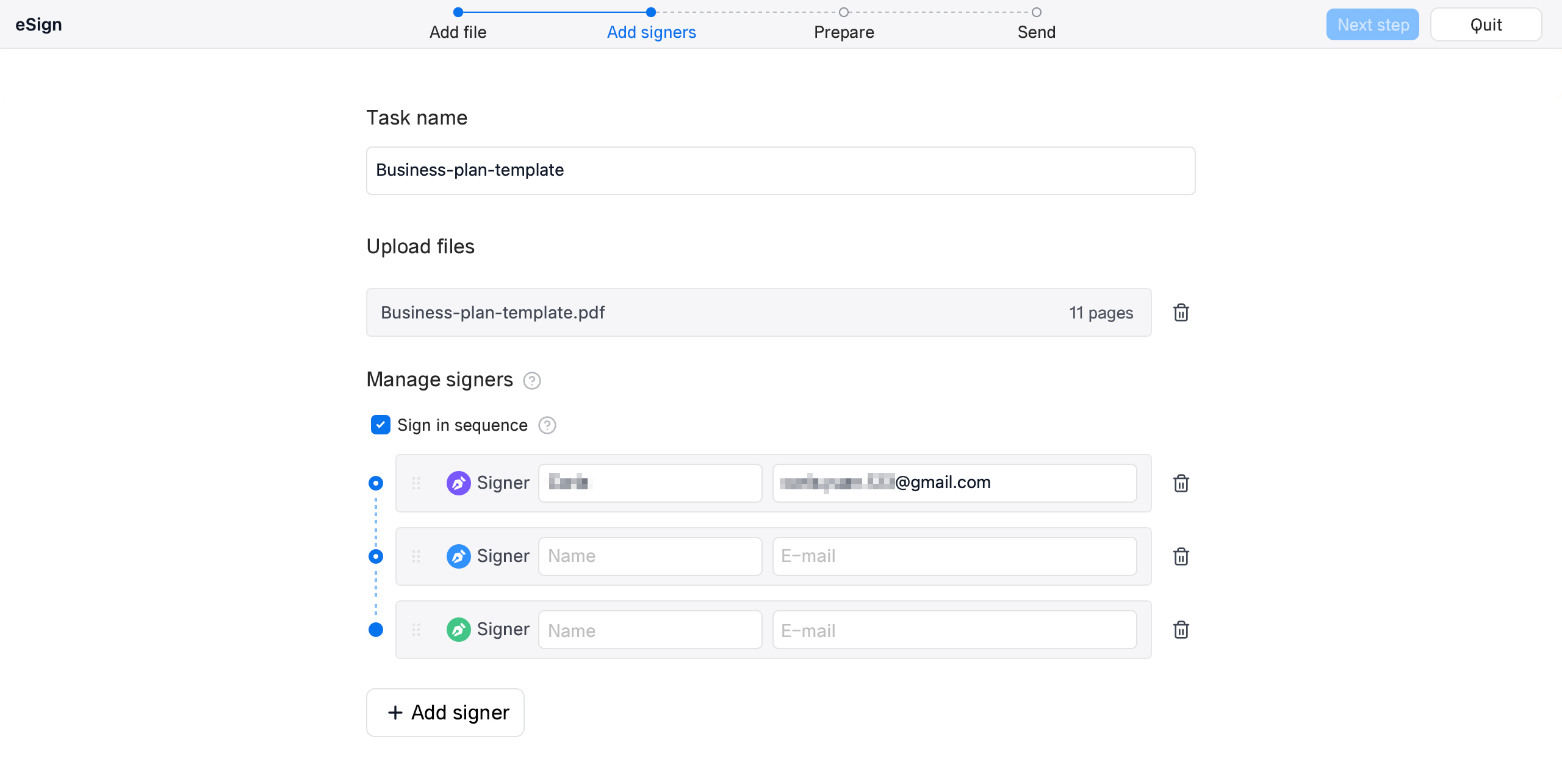
Image Source: PDF Reader Pro
● Step 3: Prepare the signature. You need to choose the signature style and type, such as name, text, date, image, etc.
Image Source: PDF Reader Pro
● Step 4: Send the signing task. You can specify the expiration date - unlimited /7 days /30 days, and an automatic expiration reminder. You can also customize messages for signatories and add CC recipients who will receive a reminder after the signing task is completed.
Image Source: PDF Reader Pro
Conclusion
The electronic signature tools available on the market vary greatly in functions and prices, and PDF Reader Pro eSign stands out for its powerful collaboration features, cross-platform flexibility, robust security measures, and competitive pricing. As discussed, it helps your team save time, reduce operational costs, and improve transparency throughout the signing process. Experience faster workflows, clearer communication, and borderless collaboration — all in one intuitive platform. Try PDF Reader Pro eSign today and transform the way your business signs documents.